An app for Claude Code

Claude Code,
better organized.

Relais sits on top of the Claude Code you already use. Your sessions sorted by project, what needs you at a glance, agents with their own browser, and one click to ship. On your Claude plan.

Get Relais $14.99/mo

Mac with Apple silicon · Claude Pro or Max · Claude Code

Larkspur/Retry Stripe webhooks with backoff
14:02
Stripe sometimes sends the same webhook twice, and when the API is down the retries pile up. Make the handler idempotent and retry with exponential backoff.

I’ll start with how webhooks are handled today.

  1. Reading the webhook handler
  2. Skip events already handled
  3. Retry delivery with backoff
  4. Test the webhook handler
Esc to stop
Last turn2m 14s48.2K → 3.1K tokensContext 31%
RunningNeeds youPushedError

This is the app itself, drawn in the page. Click around.

Who’s using itMade at Qore Games, where the teams behind eroq, Leasy, Quai and Proofit run on it every day.

  • Qore
  • Qore Games
  • eroq
  • Leasy
  • Quai
  • Proofit
Sorted by projectGroup the repos of a project. Every session and every agent lives in its group.
What needs youQuestions first, then what finished while you were away. Orange means your turn.
Agents with a browserMarketing, support, research: they work on the web and ask before they post.
Never stuck on a limitAll your Claude seats in one Relais: at a limit, the session moves to the next one and carries on.
Accounts and seats Big one

Hit a limit?
It switches seats and carries on.

Add every Claude plan you have: your own, your team’s seats, another organization. Relais keeps them in your order and starts new sessions on the first one with room. When a turn stops on a usage limit, the session moves to the next seat and carries on where it stopped, by itself. None free? It picks up at the first reset, the computer kept awake.

Claude accounts, in orderNew sessions start on the first one free
  1. 1Larkspur maya@larkspur.devTeam86%
  2. 2Larkspur maya.ops@larkspur.devTeam4%
  3. 3Personal maya@gmail.comMax31%
Working on Larkspur (maya@larkspur.dev)
Migrate the 1,200 invoices to the new template, and check each one.
The first 400 are moved and checked. Next batch…
Claude is working…

No seat free? It waits for the first reset, the computer kept awake.

Agents

Agents with their own browser.

Add Marketing, Support or Research to a project. Each has a browser of its own, signed in to its accounts: it reads, answers and fills forms, and asks you before it posts.

Agents, routines and companies
Larkspur/Marketing
MarketingWrites for indie developers: short, concrete, no hype. Posts as @larkspur_app.
Post on XWaiting for you4m
Larkspur 2.0 is out. Invoices export to CSV, webhooks retry on their own, and the billing page finally has a dark mode. What should we fix next?
146/280
QuestionWhich screenshot goes with the launch post?The CSV export or the dark billing page: both are in its folder.12m
MissedWeekly recap did not runDue Mon 09:00, while your Mac was off or Relais closed.2d

what it wrote.

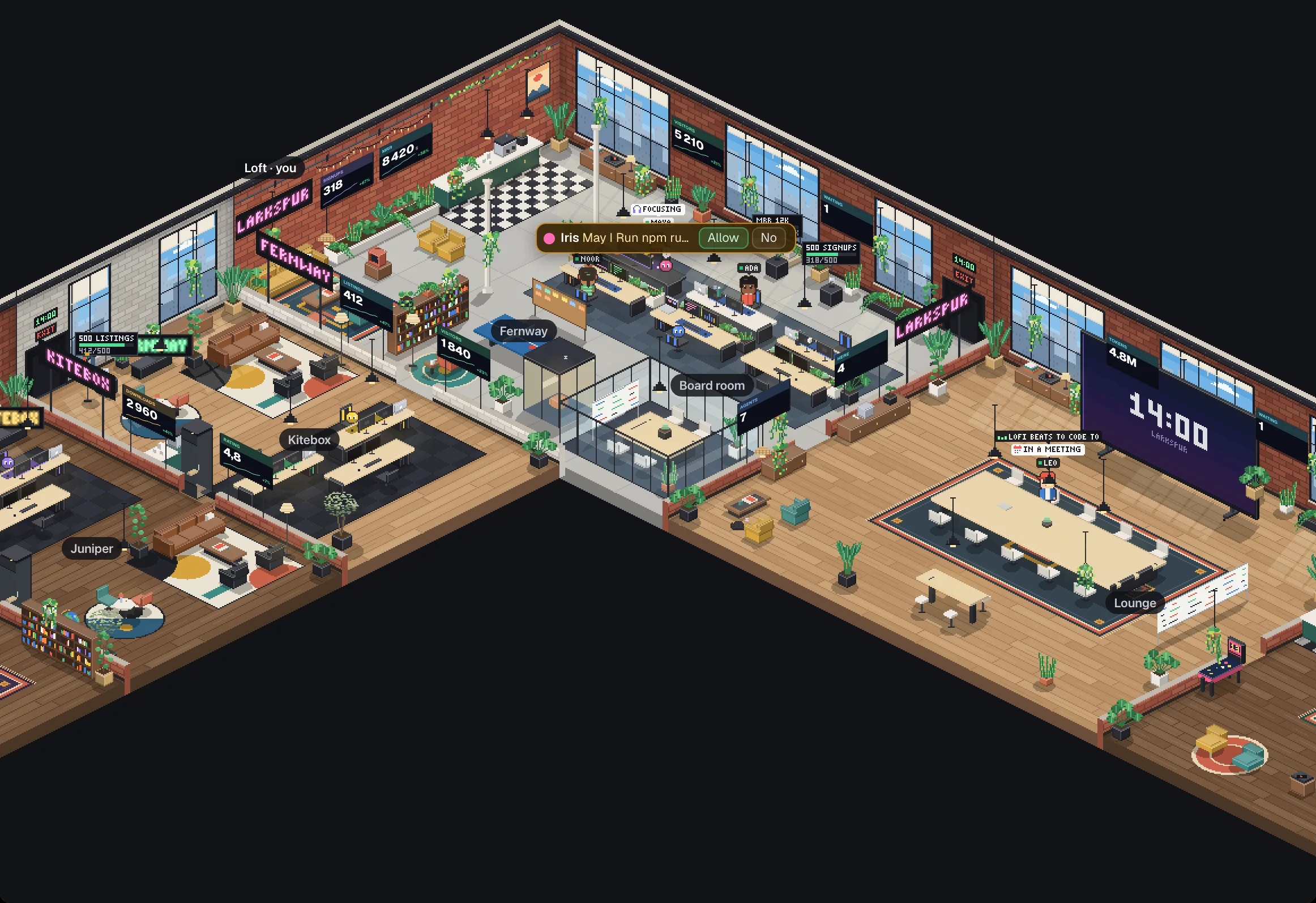
The office New

Your team, in one pixel-art office.

Turn on the Office plugin and your organization becomes a building of rooms: everyone at their desk, their agents at work beside them, and the one that needs you walking over to say so.

Tour the office
A team’s office drawn in pixel art, by day: a New York loft with people at their desks, their status over their heads and an agent asking to run a command, the company’s numbers and goals on the brick walls, small offices for its brands along one wing, the board room and the lounge along the other.
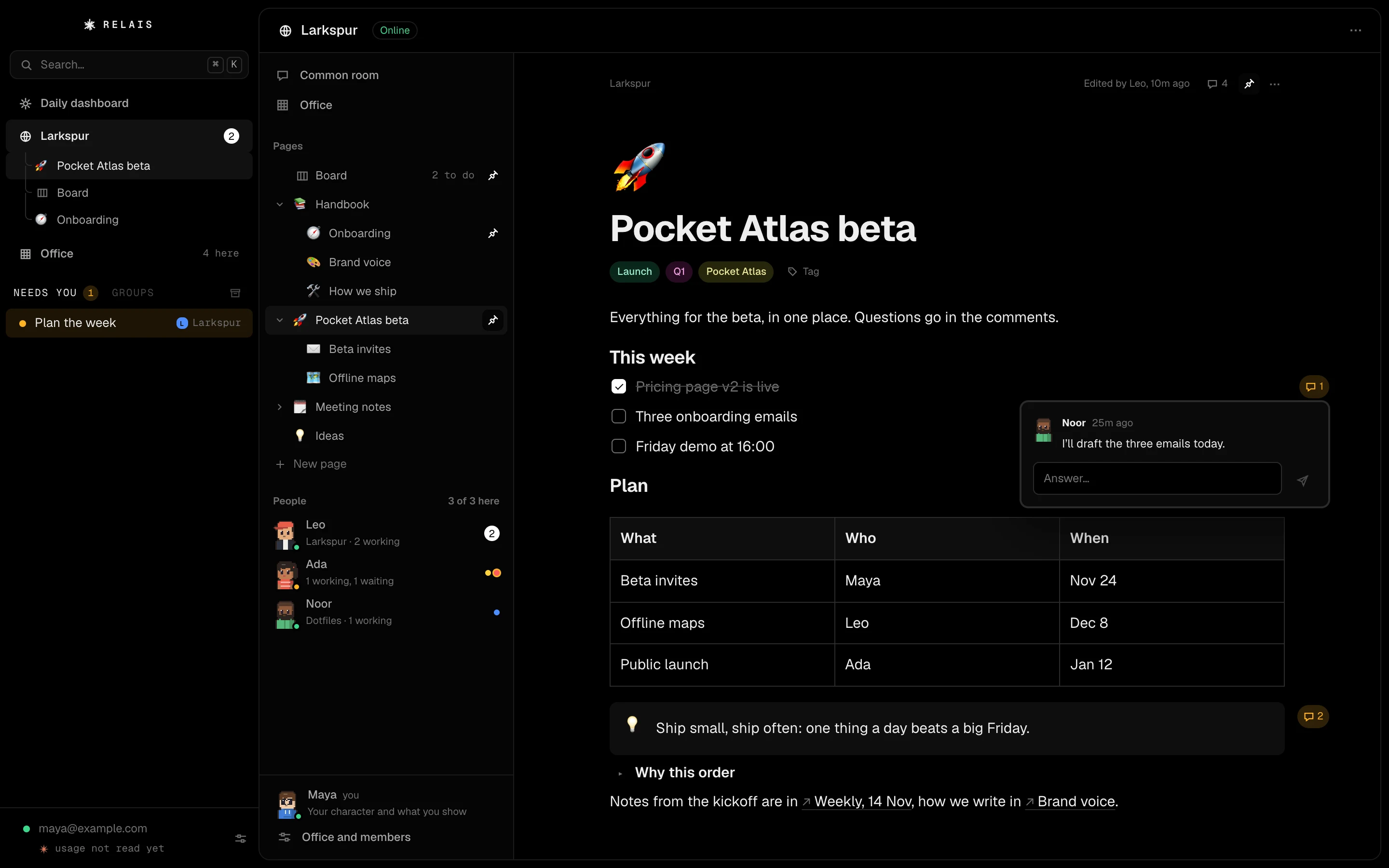
Relais’s Organization view for a made-up team, Larkspur: a tree of pages beside the Board, and the page Pocket Atlas beta open with tags, a to-do list, a table, a callout, a toggle, links to other pages and a teammate’s comment.
Pages New

Your team’s Notion, beside the Board.

A tree of pages with the blocks you know: to-dos, tables, callouts, toggles, links between pages, tags and comments on any block. Kept with your organization, written by two at once. Import your Notion export in one go.

Pages
Explorer Soon

Read and search the code,
no editor needed.

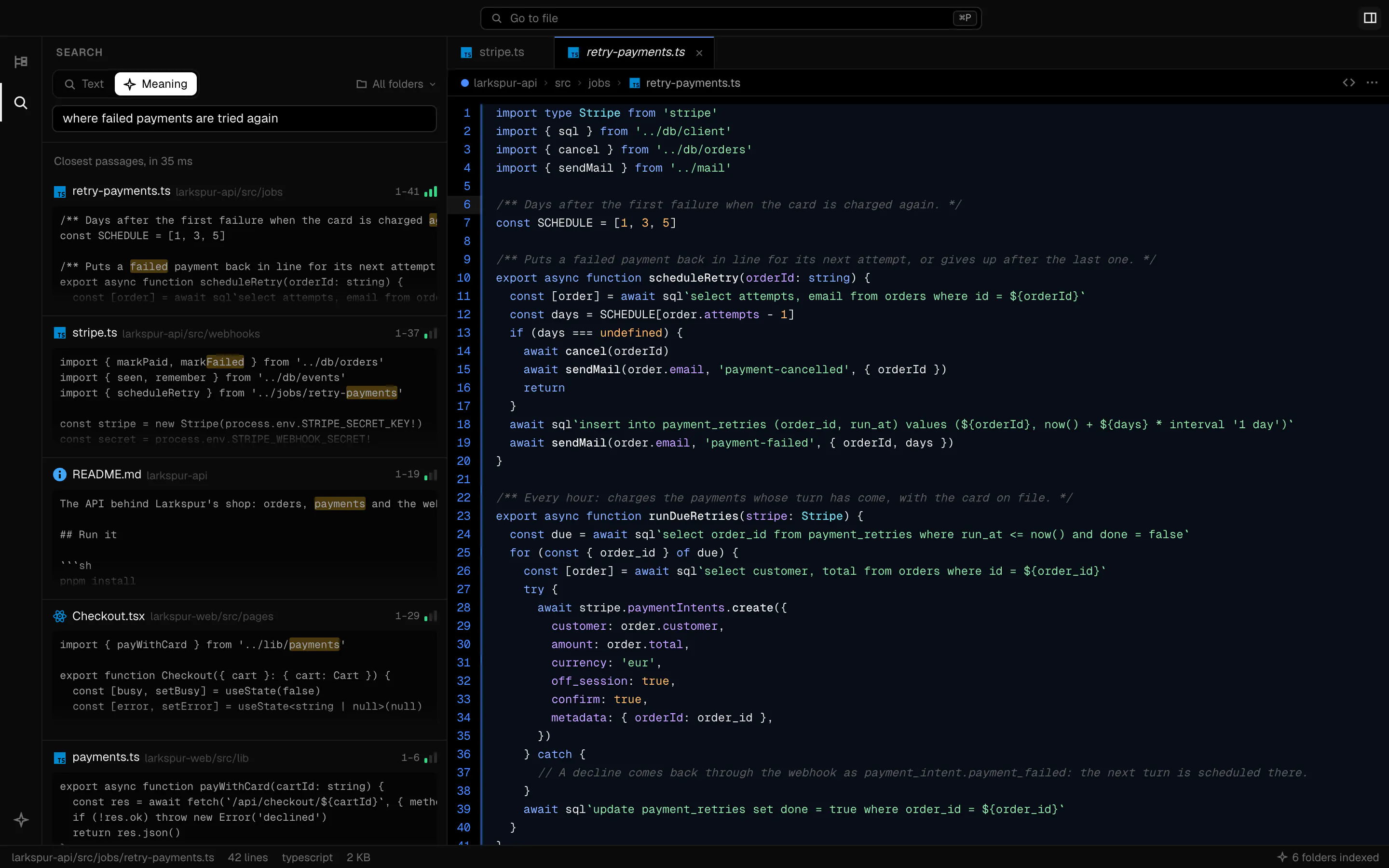
A window on every project’s folders, the way your editor shows them: tabs, colored code, ⌘P to go to a file, ⇧⌘F to search them all. Or describe what you’re looking for: the search by meaning runs on your computer.

The Explorer
The Explorer window on a made-up workspace: a search by meaning for “where failed payments are tried again” finds retry-payments.ts, open beside the results with the passage shaded.
Changes

Undo anything. Ship in one click.

The ↺ on any of your messages puts back every file Claude changed after it. The Changes tab shows what each session changed; Commit & push asks Claude to write the messages, and the session turns green.

Every feature

Press and watch the row turn green.

And the rest

Everything around your sessions.

Pricing

One price. Everything included.

Agents and the office included. Claude usage stays on your Claude plan: Relais is a flat subscription, no credits, no tiers, cancel any time.

Taxes included. Cancel any time from your account page. Your Claude plan is separate: Relais runs on it.

Questions

The short answers.

Every question
Is it an IDE, or a new AI?

Neither. Relais is a layer on top of Claude Code: no editor, no model of its own. Claude Code does the work, in your folders; Relais adds the groups, the agents with their own browser, and everything around them.

Do I need a Claude subscription?

Yes. Relais drives Claude Code, signed in with a Claude Pro or Max plan. Claude Code comes with Relais: open it and click Sign in, with your Claude account. No API key, nothing else to set up.

Does it count toward my plan’s limits?

Yes, like Claude Code in a terminal: everything Relais runs counts toward your plan’s 5-hour window and weekly limit. Your usage shows under your account in the sidebar, for every Claude client.

Can I use several Claude accounts or seats?

Yes, and it’s one of the best parts. Add your own plan, your team’s seats or another organization in Settings › Accounts, sign each in once, and put them in the order you like. New sessions start on the first one with room; when one hits its usage limit, the session carries on in the next by itself, mid-task. Each still counts toward its own plan’s limits.

Does my code go through you?

No. Relais runs on your computer and Claude Code talks to Anthropic directly, as it does in a terminal. Your groups, sessions and settings stay in ~/Library/Application Support/Relais on a Mac, ~/.config/Relais on Linux.

Mac, Linux, Windows?

A Mac with Apple silicon (M1 or later), on macOS 13 or later. Not Intel Macs. Linux is coming (an .rpm for Fedora and an AppImage, in testing); no Windows yet.

Can I cancel?

Any time, in one click from your account page. Relais keeps working until the end of the period you paid for, and nothing renews after it.

Claude Code,
better organized.

$14.99 a month, everything included. On your Mac, on your Claude Pro or Max plan. Cancel any time.