Read the code
while Claude writes it.
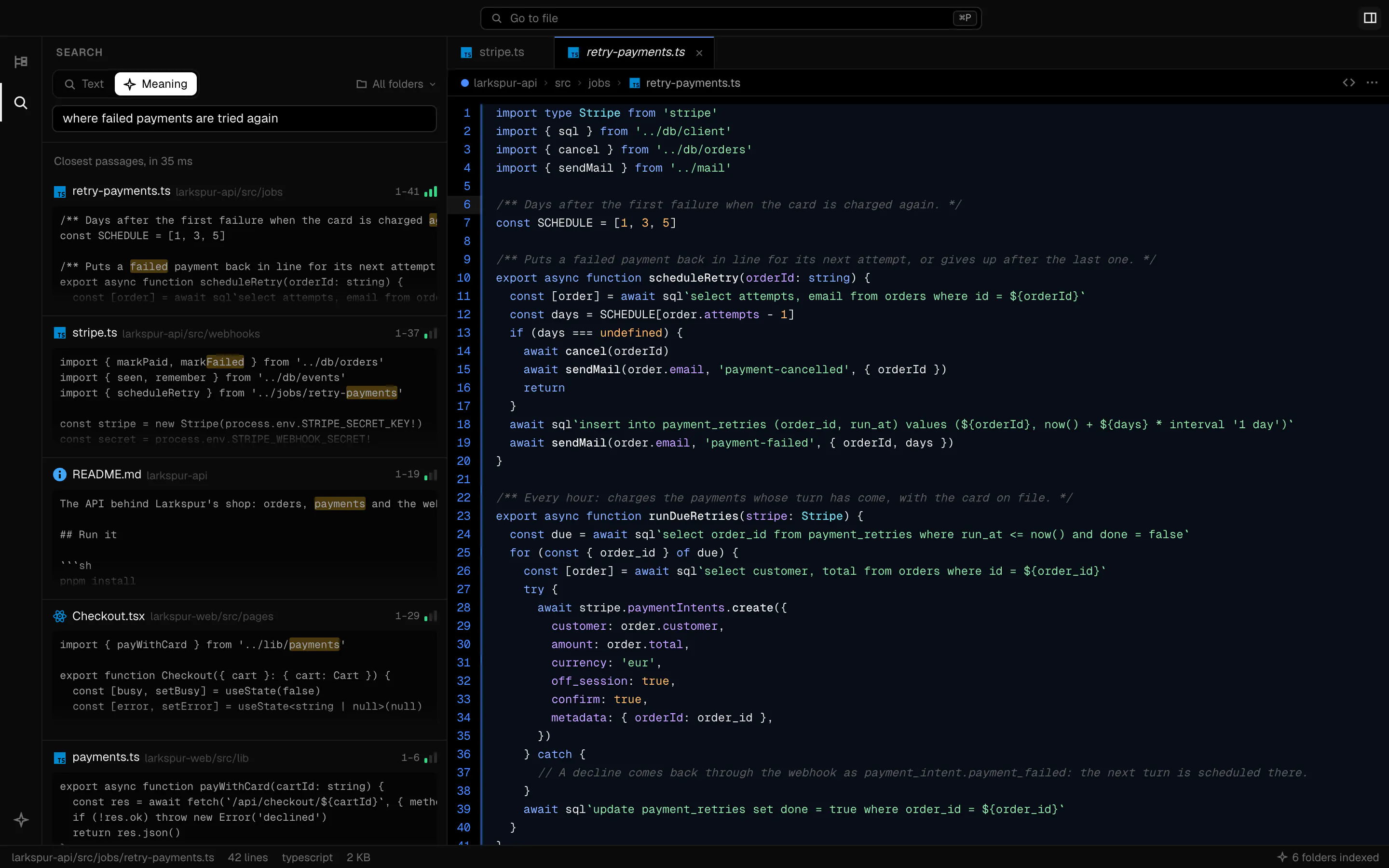
A window on every project’s folders, the way your editor shows them, with a search that finds code by what it does. No other app to open, nothing sent anywhere.
Reviewing means opening another app.
Claude changes eight files; to read them you open your editor, find the folder, find the files. And grep finds the words you guessed, not the function that retries failed payments.
- ⌘P to a fileA few letters of its name, in order: “retpay” finds retry-payments.ts. With nothing typed, the files you opened lately.
- Search in the folders⇧⌘F across every project or one: match case, whole word, regular expressions, files to include or leave out.
- Search by meaning“Where failed payments are tried again”, in any language. The model and the index stay on your Mac.
- Code intelligenceTypes on hover, go to definition, references, errors as you read: TypeScript, JavaScript and YAML out of the box; Swift, Rust, Go and Python with their language server.
- Who works on whatThe files a session is changing show who changes them, in the tree and on the tab: “Léo is changing this file.”
- Git in the treeChanged files colored with their letter, lines marked in the gutter, and each file’s diff since the last commit.
Three steps.
- 1Turn it onSettings › Plugins › Explorer. ⇧⌘E opens its window.
- 2Index for meaningTurn on search by meaning in its settings: the model downloads once, then each project’s folders are indexed on your Mac.
- 3Read, search, fix⌘P, ⇧⌘F, ⌘S. If Claude changes a file you’re editing, a bar asks whose version to keep.
Does my code leave my Mac?
No. Search by meaning runs a model on your Mac, and the index stays there.
Which languages get go to definition?
TypeScript, JavaScript and YAML out of the box, Relais workflows included. Swift, Rust, Go and Python when their language server is installed on your Mac.
Is it a full editor?
Enough to read and fix: tabs, find and replace, several cursors, ⌘S to save. Open in VS Code or Cursor is one right-click away.
Is it on by default?
No. The Explorer is a plugin, off until you turn it on in Settings › Plugins, and search by meaning is a setting of its own.
Goes well with
Read more
- Semantic code search: find code by what it does, not what it's calledHow semantic code search works (passages, embeddings, nearest neighbours), when it beats grep and when it doesn't, why it can run on your laptop, and how it saves an AI agent from reading the wrong files.
- Claude Code vs Cursor: how to choose between themClaude Code vs Cursor compared fairly: terminal agent versus AI editor, models, workflows, automation and cost, plus how to use both on one project.
- Do you need a Claude Code GUI? Options comparedClaude Code runs in the terminal, VS Code, JetBrains, a desktop app, the web and third-party apps. Here is what each GUI option does and who it fits.
Every feature
Your AI team,
on your Claude plan.
$14.99 a month, everything included. On your Mac or on Linux, on your Claude Pro or Max plan. Cancel any time.